Importer Options
Material Settings
These options control how the importer builds Maya shading networks from the source glTF material data.
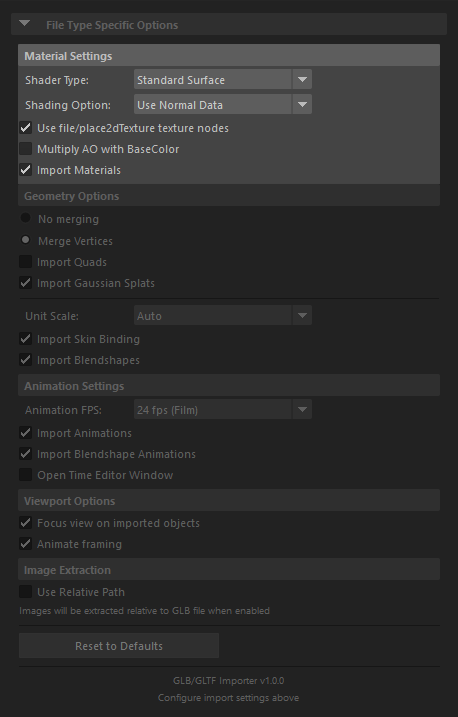
Shader Type
Choose which Maya shader family will be created for imported materials.
Standard Surface
- Default option
- Good general-purpose choice for most Maya scenes
- Preserves the broadest set of imported material data in a renderer-friendly way
Arnold
- Creates Arnold-native shading nodes
- Recommended when your look-dev and rendering pipeline already targets Arnold
OpenPBR
- Available in newer Maya versions
- Useful when your scene pipeline is built around OpenPBR
- Some renderer/viewer combinations still approximate parts of the material response
Stingray
- Simpler material target focused on basic glTF channels
- Best suited to lightweight round-trip or compatibility-oriented workflows
- Advanced glTF material extensions are more limited here than in Standard Surface or Arnold
Shading Option
Controls how Maya handles imported normals.
Use Normal Data
- Default option
- Preserves the normals authored in the glTF asset
Harden Edge
- Rebuilds shading with harder edge separation
- Useful for hard-surface assets
Soften Edge
- Rebuilds shading with softened edges
- Useful for organic assets where you want Maya to smooth the result
Use file/place2dTexture Texture Nodes
- Enabled by default
- Imports textures as Maya
filenodes withplace2dTextureplacement nodes instead of ArnoldaiImagenodes - Recommended for round-trip workflows because it preserves UV transforms, and UV-set selection in a form the exporter can read back reliably
- Disable this only when you explicitly want the Arnold-centered texture-node workflow
Multiply AO with BaseColor
- Disabled by default
- Reads occlusion from the ORM texture's red channel and multiplies it into the base-color result
- Useful for viewport preview workflows where you want baked-looking diffuse shading in Maya
- Leave disabled if you want a cleaner separation between base color and occlusion data
Import Materials
- Enabled by default
- Creates shaders and shading groups from the glTF material data
- Disable when you only need geometry, animation, or scene structure without imported shading networks
Note: To evaluate advanced properties such as sheen, iridescence, clearcoat, transmission, and related PBR extensions, use Arnold in the viewport or render the asset with Arnold. Maya's default viewport does not fully represent every imported glTF material feature.