Importer Options
Geometry Options
Geometry options control how mesh topology, scale, deformation data, and optional non-mesh primitives are created during import.
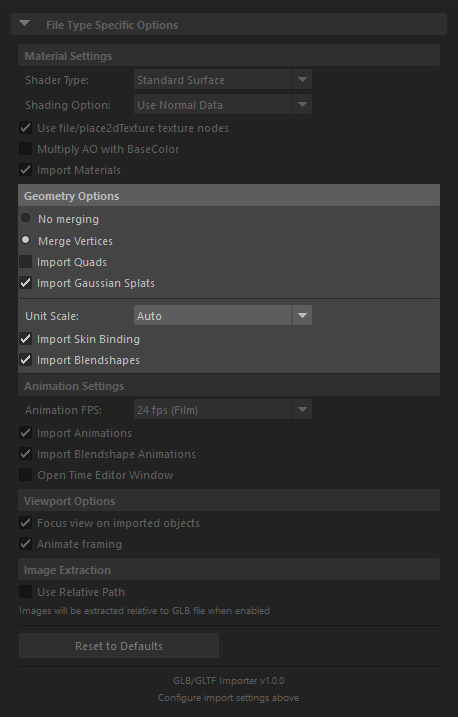
Merge Strategy
Merge Vertices
- Default option
- Merges duplicate vertices that share the same position while preserving UV seams
- Recommended for most asset imports
No Merging
- Keeps vertices split exactly as authored in the source asset
- Useful when you need a closer one-to-one topology match with the imported file
Import Quads
- Disabled by default
- Reconstructs quad or n-gon topology when the source file carries
MAYA_original_topologyextras - Intended for round-trip workflows where the file was exported with quad-topology preservation enabled
- If the extra data is not present, the importer falls back to triangles
Import Gaussian Splats
- Enabled by default
- Imports
KHR_gaussian_splattingpoint primitives asgaussianSplatShapenodes - Requires the external
gaussianSplatMaya plug-in to already be loaded and to support payload import - When that plug-in is unavailable, the importer skips gaussian splat primitives and reports a warning
Unit Scale
- Available values: Auto, 1.0, 100.0
- Auto is the default and is the safest choice for most files
- 1.0 is useful when imported assets appear too large for your scene scale
- 100.0 can be useful when the incoming asset needs to be scaled up into Maya scene units
Import Skin Binding
- Enabled by default
- Creates skinClusters for skinned meshes
- Disable if you only need static geometry and want to reduce scene complexity
Import Blendshapes
- Enabled by default
- Imports morph targets as Maya blendShape nodes
- Disable if you only need base meshes without shape-deformation controls